Digitizing the Last Mile: OCR in Research Administration
By Luke Sheneman
Download the full paper
1. The Silent Crisis of Data Entry in Sponsored Programs
University research departments receive billions of dollars in federal grants each year, but managing those grants is surprisingly old-fashioned. When a university gets a grant award, the official notice arrives as a PDF, and staff have to manually copy all the important details — like budget amounts and dates — into the university’s computer systems by hand. This “swivel-chair” process, where someone switches back and forth between a document on one screen and a data-entry form on another, is slow and easily leads to mistakes. Even a small typo in a dollar amount or grant number can trigger serious compliance problems or require repayment of funds. As federal regulations grow more complex, relying on humans to read and retype thousands of pages of grant documents is simply no longer sustainable.
2. The “PDF Trap” and the Failure of Data Standardization
The federal government has tried for decades to make grant data more standardized and machine-readable, but these efforts haven’t fully succeeded. While universities submit grant applications through digital portals, the award notifications they receive back are still often unstructured PDF documents — not organized, computer-friendly data. These PDFs come in three problematic varieties: “born digital” files whose layout gets scrambled when copied, scanned paper documents that are really just pictures, and hybrid files that mix both types. Because each federal agency formats its award documents differently, there is no reliable way for computers to automatically read and understand them all. This creates an urgent need for smarter technology — specifically, advanced Optical Character Recognition (OCR) — to bridge the gap.
3. The Evolution of Optical Character Recognition
The technology capable of unlocking the data trapped in federal grant PDFs has a rich history, evolving from rudimentary pattern matching to the vision-language models of the artificial intelligence era. Understanding this trajectory is helpful for Research Administrators to evaluate current tools; knowing why a legacy system fails on a complex budget table requires understanding the architectural limitations of its era.
Matrix Matching (1920s – 1950s)
The origins of OCR predate modern computing. In the early 20th century, inventors like Emanuel Goldberg and Gustav Tauschek developed “reading machines” utilizing photo-electric cells. Goldberg’s “Statistical Machine” (1931) searched microfilm archives using an optical code recognition system. These early devices relied on Matrix Matching (also known as template matching).
In this paradigm, the machine compares the image of a character pixel-by-pixel against a stored library of templates (glyphs). If the input image of the letter “B” overlaps sufficiently with the stored template for “B,” a match is registered as shown in Figure 1.
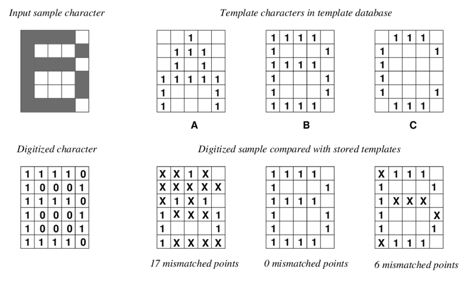
Relevance to RA: While obsolete, the concept of matrix matching explains why early digitization efforts failed so spectacularly with varying fonts. If a grant letter was printed in Courier but the system was calibrated for Helvetica, the pixel overlap would fail. This brittleness made automation impossible for the diverse typography of federal correspondence.
The Age of Feature Extraction (1960s – 1990s)
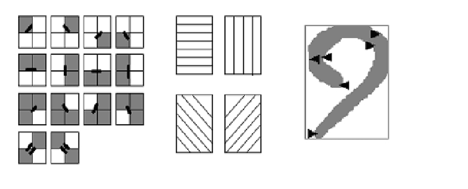
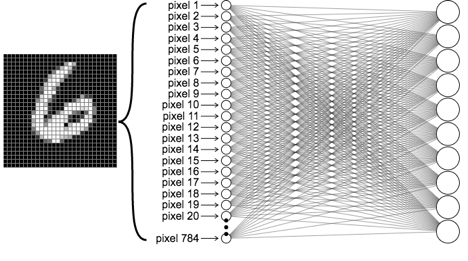
The introduction of digital computers allowed for a more abstract approach: Feature Extraction. Instead of matching pixels, software began to analyze the geometric properties or “features” of a character (Figure 2). Ray Kurzweil, a pioneer in this field, developed “omni-font” OCR in the 1970s.
The Machine Learning Era and Tesseract (1990s – 2015)
The release of Tesseract as an open-source project by Google in 2005 marked the democratization of OCR. Initially developed by Hewlett-Packard, Tesseract evolved to incorporate machine learning techniques. By version 4, it implemented Long Short-Term Memory (LSTM) networks, a type of Deep Learning Network optimized for sequence data.
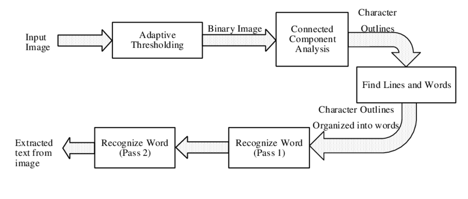
The “Pipeline” Problem: Despite improved character accuracy, these systems operated in a rigid pipeline:
For Research Administrators, the pipeline is a point of failure. If the layout analysis step fails to detect the faint gridlines of a budget table in a scanned PDF, the subsequent text recognition step will mash the “Salaries” and “Equipment” columns together. The system has no semantic understanding that “Year 1” is a header that should govern the data below it.
Deep Learning Revolution: Vision-Language Models (2018–Present)
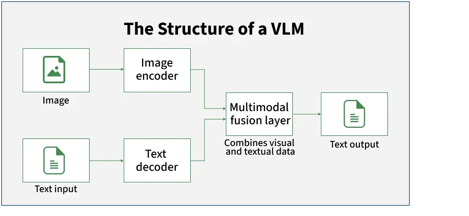
The current state-of-the-art has shifted from “reading text” to “seeing documents“. The advent of the Transformer architecture has given rise to Vision-Language Models (VLMs).
4. The Technical Anatomy of Grant Documentation
The technology capable of unlocking the data trapped in federal grant PDFs has a rich history, evolving from rudimentary pattern matching to the vision-language models of the artificial intelligence era. Understanding this trajectory is helpful for Research Administrators to evaluate current tools; knowing why a legacy system fails on a complex budget table requires understanding the architectural limitations of its era.
To select the right OCR solution, Research Administrators must understand the specific adversaries they face: the technical complexity of the documents generated by federal agencies.
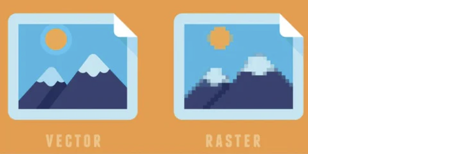
The Raster vs. Vector Dichotomy: Not all PDFs are created equal.
Not all PDFs are equally machine-readable and treating them as interchangeable inputs in an OCR or data extraction pipeline is a common and costly mistake. The underlying structure of a PDF determines whether text can be directly extracted, must be inferred from pixels, or falls somewhere in between. Understanding these distinctions is essential for building reliable, automated document processing workflows.
The Table Recognition Bottleneck
Tables are the nemesis of traditional OCR. Extracting data from tables using Optical Character Recognition (OCR) is considered one of the most challenging tasks in document processing because it requires not only character recognition but also structural understanding: mapping text to specific rows and columns.

In a Notice of Award, the financial data (the most critical data for account setup) is almost always tabular.
Multilingual and Special Character Complexity
While US federal grants are English-dominated, global research collaborations introduce multilingual complexity. Sub-awards to foreign institutions may involve documents in French, Spanish, or Chinese. Additionally, scientific grants (NSF, DOE) often contain mathematical formulas. Traditional OCR engines strip out mathematical symbols or garble them (e.g., turning a summation symbol S into an ‘E’). Specialized models are required to preserve the integrity of scientific notation in grant abstracts and technical reports.
5. Generative AI Approaches to Document Understanding
Artificial intelligence has transformed the way computers can read and understand documents, but two very different approaches have emerged. The older “RAG” approach first extracts text with OCR and then feeds that text to an AI to answer questions — but if the OCR step garbles a table, the AI cannot fix it. The newer “Native Vision” approach skips the separate OCR step entirely: the AI model looks directly at the document image and understands both the text and the layout in one pass. This is far more powerful, especially for complex tables and forms where meaning depends on where things appear on the page. However, because these AI models predict answers rather than simply reading them, they can sometimes produce plausible-sounding but incorrect numbers — a serious risk in financial contexts, which is why human review of the AI’s output remains essential.
The integration of Generative AI (GenAI) has bifurcated the OCR landscape into “Extractive” vs. “Generative” approaches. This distinction is vital for RAs deciding between a secure, local solution and a cloud-based AI service.
RAG (Retrieval-Augmented Generation) vs. Native Vision
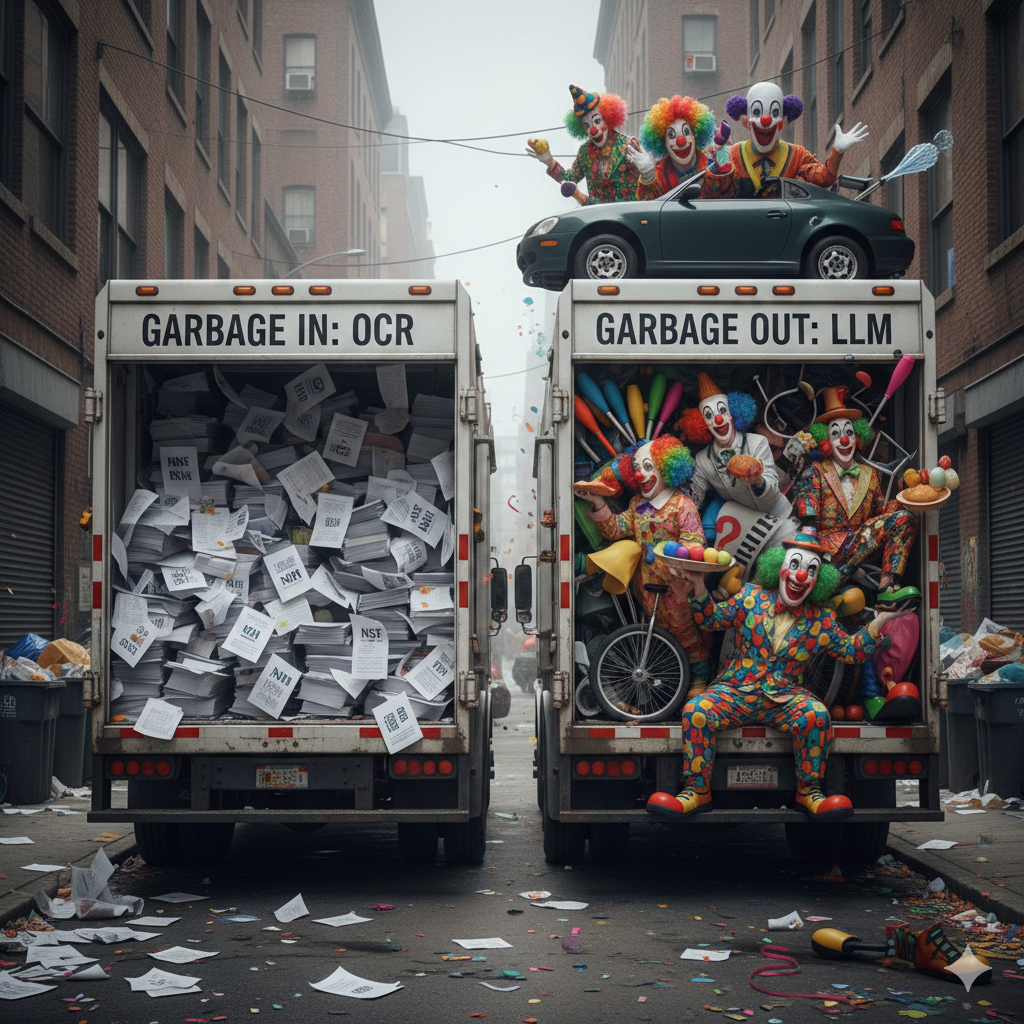
Before diving into modern “Chat with your PDF” tools, it is important to distinguish between systems that treat documents as plain text and those that reason directly over visual structure. Most production systems today rely on Retrieval-Augmented Generation (RAG), where OCR output becomes the sole interface between the document and the LLM. This architectural choice
Native Multimodal Vision: The “End-to-End” Paradigm
A newer, more powerful approach uses native multimodal vision models (e.g., Gemini 3, GPT-5, dots.OCR) that treat the document as an image first, not just as extracted text. Instead of running a fragile OCR pipeline and then asking an LLM to “fix” the results, these models reason directly over the visual layout of the page. This allows them to jointly understand content and structure in one pass, which is especially important for tables, forms, and other layout-heavy documents where meaning is encoded spatially.
The Vision Workflow:
The Hallucination Risk
While Native Vision models are superior for layout understanding, they introduce the risk of hallucination. Because they are generative (predicting the next token), there is a non-zero probability that the model might “correct” a messy number into something it thinks looks plausible but is factually wrong.
In Research Administration, where a single digit error in a budget is unacceptable, this necessitates a “Human-in-the-Loop” workflow, where the AI’s output is treated as a proposal to be validated, not a fact to be blindly accepted.
6. Review of OCR Solutions for Research Administrators
There are many OCR tools available today, ranging from free open-source software to expensive enterprise cloud services. Free tools like Google’s Tesseract are useful for simple text but fail badly on the complex layouts found in grant award documents. Cloud services from Amazon, Google, and Microsoft are more capable and easier to use, but they require sending sensitive grant data to outside servers — raising privacy and security concerns, especially for grants with federal data restrictions. Specialized platforms like ABBYY and Rossum can be highly accurate but are expensive, rigid, and difficult to update when document formats change. For universities that need both power and data privacy, the newest Vision-Language Models represent the most promising direction.
7. Why dots.OCR is the Preferred OCR Choice for Research Administrators in 2026
After evaluating all available options, dots.OCR stands out as the best choice for university research offices in 2026 for four key reasons. First, it uses a single AI model that reads the entire page at once, understanding tables the way a human would rather than reading awkwardly line by line. Second, it achieves the highest accuracy scores on complex tables — outperforming even Google’s most advanced models on a standard industry benchmark. Third, it is compact enough to run on standard university hardware without ever sending data to an outside cloud service, keeping sensitive grant information secure on campus. Fourth, it can be guided with plain-language instructions to adapt to different document formats, so it does not require expensive technical reconfiguration every time an agency updates its paperwork.
Based on a synthesis of architectural capabilities, benchmark performance, and the specific constraints of Research Administration (data privacy, budget, and document complexity), dots.OCR emerges as the superior strategic choice in early 2026.
This conclusion is driven by four key pillars: Unified Architecture, Table Precision, Efficiency/Privacy Balance, and Adaptability.
The Power of Unified Vision-Language Architecture
The fundamental flaw of traditional solutions (like Textract or ABBYY) is the separation of layout analysis and text recognition. If the layout engine fails to see a “ghost line” in a borderless budget table, the text recognition engine reads across the row, merging the “Salaries” column with the “Fringe Benefits” column. This error is fatal for financial data entry.
dots.OCR avoids this by using a single Transformer model to process the entire page context simultaneously.37
State-of-the-Art Table & Layout Parsing
In Research Administration, the hardest information to extract is rarely narrative text. It is structured data embedded in layout. Nearly every high-value field that an SPO or post-award office cares about lives inside a table: line-item budgets, cost share breakdowns, effort commitments, reporting schedules, subrecipient lists, period-of-performance summaries, and compliance certifications. These are not just “text blocks” but spatial data structures where meaning is encoded in rows, columns, headers, and visual grouping.
Traditional OCR pipelines treat tables as an inconvenient special case. They flatten a two-dimensional grid into a one-dimensional stream of tokens, often destroying the very structure that defines what each number means. Borderless tables, spanning headers, nested footnotes, and multi-level column groupings common in federal forms routinely break heuristic table detectors, leading to outputs that look machine-readable but are semantically wrong. Once that structure is lost, downstream LLMs cannot reliably reconstruct it.
State-of-the-art document AI systems therefore live or die by their table and layout parsing performance. High accuracy here is not a “nice to have.” It directly determines whether budget totals are attributed to the correct categories, whether indirect costs are distinguished from direct costs, and whether reporting obligations are captured correctly. In practice, this is the difference between automation that quietly saves staff hours and automation that creates new compliance risk by producing plausible but incorrect structured data.
The Efficiency and Privacy Sweet Spot
Research Administrators deal with sensitive data. Grant proposals contain proprietary intellectual property (IP); NoAs contain salary information which is Personally Identifiable Information (PII). Grants from the Department of Defense (DOD) or Department of Energy (DOE) often come with Controlled Unclassified Information (CUI) restrictions that strictly regulate data handling.

This capability is relevant for compliance with strict federal data security mandates.
Adaptability via Prompting
Unlike ABBYY, which requires rigid templates that break when a format changes, or Tesseract, which has no control interface, dots.OCR is promptable.
Comparative Summary: dots.OCR vs. The Field
| Feature | Legacy (Tesseract/ABBYY) | Cloud Giants (Textract/Google) | General VLMs (GPT5/Gemini) | dots.OCR |
| Architecture | Pipeline / Template | Proprietary Pipeline | Large VLM | Unified Compact VLM |
| Table Accuracy | Low / Brittle | Moderate (Costly) | High | SOTA (88.6% TEDS) |
| Data Privacy | High (Local) | Low (Cloud Egress) | Low (Cloud Egress) | High (Local Deployment) |
| Cost Model | License / Free | Per Page Metered | Per Token (Expensive) | Open Source / Compute Only |
| Setup | High (Templates) | Low (API) | Low (API) | Moderate (Self-Host) |
| Hardware | Low (CPU) | None (SaaS) | None (SaaS) | Moderate (Consumer GPU) |
Conclusion: dots.OCR is the current preferred choice because it democratizes “Big Tech” document intelligence. It gives the Research Administration office the table-parsing power of a Gemini or GPT-class frontier model without the exorbitant per-page costs or data privacy compromises, all in a package that fits on local hardware.
8. Implementation Guide for Research Administrators
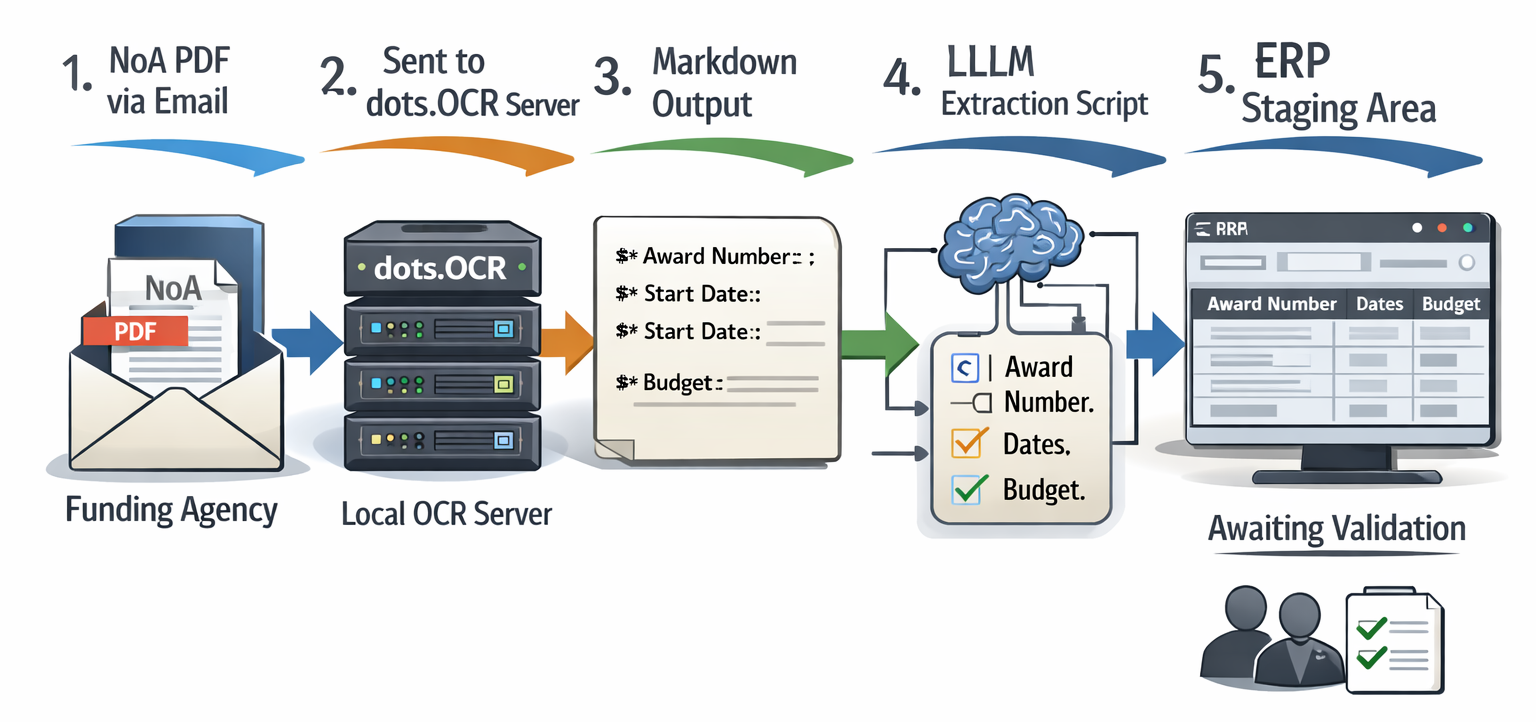
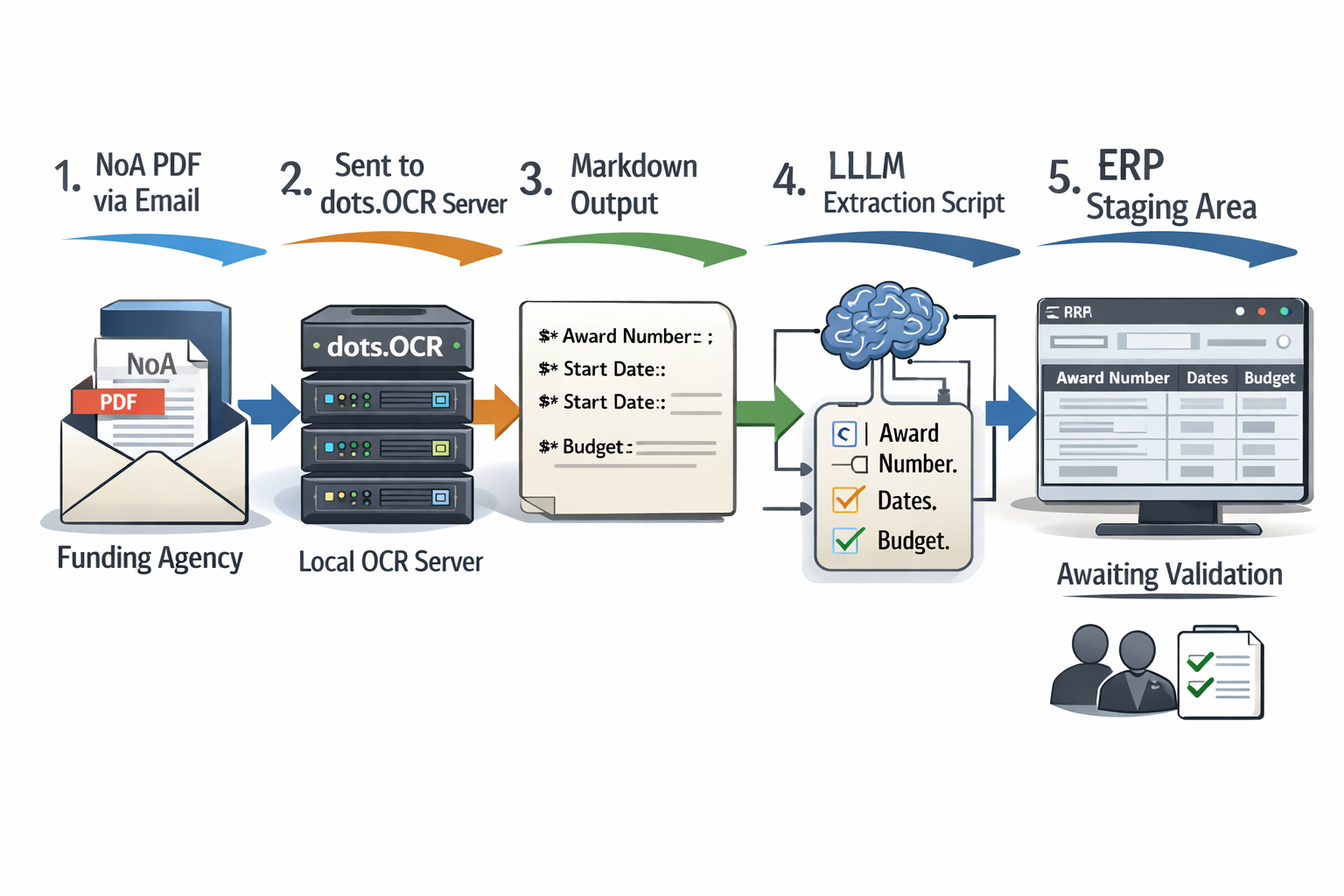
Putting dots.OCR to work does not require a supercomputer — a standard workstation with a modern graphics card is sufficient, and it can even run on a recent Mac laptop. The University of Idaho’s AI4RA team has developed a free, open-source tool called dots_ocr_api that makes it easy to submit a PDF and receive back structured, machine-readable text. A typical workflow would have the system automatically receive a grant award PDF, pull out the key data fields, and stage them for staff to review and approve before anything is entered into the university’s financial system. This human review step is important because even the best AI is not perfect — especially on very low-quality scans or handwritten notes in the margins. A tool called Vandalizer, currently in development, aims to make these workflows even simpler, requiring no technical knowledge from the user.
Deployment Architecture & Hardware
To run dots.OCR effectively, an institution does not need a supercomputer.
Data scientists at AI4RA at the University of Idaho developed and disseminate dots_ocr_api, a simple open source API wrapper around dots.OCR. Once deployed and configured on your server or workstation at your institution, you can easily submit a PDF and retrieve markdown.
Example Automation Workflow:
Bridging the DATA Act Gap
While waiting for federal agencies to fully comply with DATA Act machine-readable standards, dots.OCR acts as the essential bridge. It essentially “upgrades” legacy PDF NoAs into the machine-readable format that agencies should be providing. This empowers institutions to perform analytics on their grant portfolios. As an example instantly querying “Show me all awards received in 2024 that contain a ‘Data Sharing’ clause,” a task that would previously require opening and reading hundreds of files.
Convenience tools like Vandalizer, currently under development by the University of Idaho through funding by NSF GRANTED, lower the technical barriers so RAs can perform OCR, extraction, and reporting workflows using only a browser.

Bridging the DATA Act Gap
While dots.OCR is State-of-the-Art, it is not magic.
9. Conclusion
The burden of manually re-entering grant data from PDF documents is a hidden cost that slows down research and creates compliance risks across university research offices. The good news is that modern AI-powered OCR technology has finally matured to the point where it can reliably read even the most complex federal grant documents. dots.OCR in particular represents a major step forward, offering the accuracy of expensive cloud services in a package that can run securely on campus without outside data sharing. By automating the most tedious parts of grant setup, research administrators can spend more time on meaningful work — supporting faculty researchers and managing compliance risk. The digital future of research administration is here, and it fits on a standard office workstation.